-

-


Follow Us
-

 On Facebook
 On Flipboard


The cost of living weighs on everyone who is breathing in the world. When you are playing a deep life-sim game like Paralives, you are also going to get this part of life simulated with bank statements to sift through and bills to pay here as well.
Paralives does give you the option to pay the bill or throw them into the pile. The game also has consequences ready to fire the moment you decide to stop paying any bill.
There is a legitimate process to bill payment system in Paralives, even though the game carries the status of Early Access. Here, we will take a good look at each aspect of bill payment and how you can pay the bill in Paralives.
How to Pay Bills in Paralives
Once you get a bill delivered to you, open the bill and click on the Settle button, next to the Total amount, to finalize the payment. As long as you have the money to pay the bill, clicking on the Settle button will debit the bill amount from your overall household fund to the overlord governmental system of Paralives.
- Computer Payment: You can pay the bill by using the computer in the house
- Mailbox Payment: Checking the mailbox also allows you to make bill payments.
After paying the bill, why not use the Photo Mod to take a picture and share it with the world to encourage other parafolks to become a responsible adult in the game?
Do remember to click on the stamp to collect it before making the bill payment if you are looking to build a stamp collection in the game.
Other Ways to Pay the Bill in Paralives
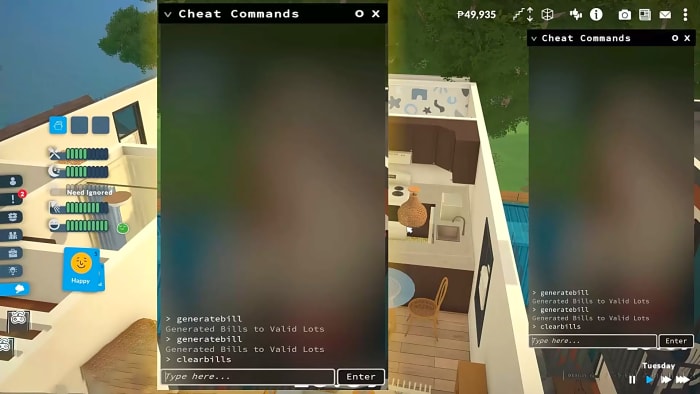
Let’s say you don’t want to pay the bill by spending your money, or you don’t have enough money in your household fund to pay the bill. Here, we can rely on our good friend Cheat Command to take care of the pesky bill payments.
- First, open the Cheat Command by pressing Ctrl +F1 or Ctrl + Shift + C at once.
- You can view your current bill by typing ‘generatebill‘ and hitting Enter. This will open up the current bill to the HUD of the display. Here you will see all the expense details, but most importantly, the Total Amount.
Note: Another command for clearing the bill, ‘clearselectedcharacerbills’, type the entire command without any spaces in between to clear the bill.
- Now type in ‘clearbill‘ to clear the bill payment.
If that feels way too easy, then you can add money to your household and then decide to pay it genuinely. You can use the command setmoney *amount* or printmoney *amount* to add money to your household fund. If you quickly want to get rich, then just type in Jackpot, and you will immediately get 50,000 Paradimes.
If you are not fond of using Cheat Command to pay the bill, then get a job that pays a steady income every month. Each para in the game can hold down to more than one job in their life, earning a substantial amount to clear any bill payment on a weekly basis.
How Do You Get Bills in Paralives

Building a house and expanding your family by adding new family members is part of life, and so is paying a hefty amount of money every single week to keep the system running in a perfect circle. If you are breathing and alive, you must pay your bills every single week.
Note: The Early Access mode might make changes to the bill payment later on in the full release. But for now, we must abide by the current law of the payment system.
Bill Details:
- How do you receive the bill? Bills will show up as a piece of paper in your Mailbox. You will get the notification on your Phone, computer, and as a house alert.
- View Bill: The bill will open up automatically. You can also open the bill manually by clicking on the Envelope icon at the top right corner of the screen, next to the three-dot icon.
- Expenses Details: Like any regular bill, the bill in Paralives will cover expenses such as – Lot Tax, Electricity, Family benefit, Municipal Tax, water, food, furniture, etc.
| Bill Info | Cost | Details |
| Municipal Tax | 0.5 % of your Household fund | You can set the amount the way you see fit. |
| Electricity Tax | 0.08 Paradime per Kwh | The number of appliances will influence the electricity tax. |
| Water Tax | 0.10 Paradime per liter | If you have built a fancy Lot, then you might get hit with an amount. |
| Family Benefit | 200 Paradime per child in your Household | Only if you have a baby in your Household |
Tip: Cutting down the number of appliances and lowering the Lot’s water requirement will significantly cut down their expenses on the bill. You can resort to using Wind Turbines or Solar Panels to generate electricity for the household. So if you are getting a hefty amount of tax at the end of every week, then you need to make subtle and not-so-subtle changes to your lifestyle to live comfortably.
- Individual or Household? The bill is set for the entire Household; individual members in your family don’t get their own separate bill. Since individuals can’t set up their own bank account or set funds for each other.
There are talks of adding Child Allowance, Governmental benefits, Voluntary taxes, and more to the bill system, so we might see a more robust tax system in Paralives.
What Happens If you fail to pay the Bill?

If you fail to pay the bill, the city will put your house through many power outages, where almost all of your electrical devices in your house will stop working. If you used the Cheat Command to clear the bill, you might also run into the issue.
Here, open up Cheat Command by pressing Ctrl + F1 and type in ‘fixoutage‘ to clear out any power outage problems. You can also create a power outage by typing ‘causeoutage‘.
Nobody likes to pay their bills; that’s why we provided a Cheat Command list to help you clear out the bills quickly. But if you want to live a legitimate life in Paralives, then you must get a good job to run a legitimate household that pays its bills and keeps everything clean.
More must-reads:
- Awful Aaron Judge injury update could define Yankees' season
- Blockbuster trade proposal sends Lions fan favorite to Chiefs to replace Travis Kelce
- The 'Most 1,400-yard NFL seasons' quiz
Breaking News
Trending News


Customize Your Newsletter
 +
+




Get the latest news and rumors, customized to your favorite sports and teams. Emailed daily. Always free!
PRIVACY POLICY COOKIE POLICY CONTACT US
ABOUT YARDBARKER TERMS OF SERVICE


By using this site, you agree to our Terms of Service and Privacy Policy.
This site is for entertainment purposes only.
There is no gambling offered on this site.
Gambling Problem? Call 1-800-Gambler.