-

-


Follow Us
-

 On Facebook
 On Flipboard


In Heartopia, you can play classic games such as Hide & Seek with strangers or your friends. It’s your basic prop-hunt gameplay, but it takes place around your house. You can either play as the seeker, whose job is to find the fake prop, or the hider, who gets to become the fake prop to confuse the seeker. It’s the classic cat-and-mouse gameplay that gets more entertainment with more players.
The process of hosting and joining a Hide & Seek game is simple and easy. You have the option to host the game or join for a quick drop-in and drop out. Each round is also a timer, just like in the real world, or it could go on forever, as there are some crafty players who have mastered the game and know the best spot and prop fitting for a master play.
Here, we will cover everything you must know about the Hide & Seek party game in Heartopia.
How to Host a Hide & Seek Party in Heartopia
Once you are at home, open up your Watch, then scroll down to find the Party icon. Click on the icon to open up the party features. Here, you will see Tea Party, Parkour Party, and Hide & Seek Party. Now choose Hide & Seek Party, and then we set up the hosting process.
If you look at the top right, you will see some options. Here is what they are:
-
Add Tags:
- This is meant to help customize the party details. If you are looking for a rough and tough Hide & Seek game, then you can set the tag to Hardcore. If you just want to lie back and chill with the game of Hide & Seek, then Casual will be more to your liking.
| Casual | Hardcore | Fun | Healing |
| Zany | Thrilling | Passionate | Suspense |
| Horror | Cute | Cool | Simplistic |
| Gorgeous | Realistic | Dreamy | Retro |
| Modern | Future | Forest | Ocean |
You are not limited to only one tag; you can select a max of 3 tags for your party, so the players who will join your Hide & Seek Party will be aware of the theme of the party and what to expect from the game.
-
Join Permission: Determines who can join your Hide & Seek Party.
- Invite Only: The person who gets the invitation gets to join the Hide & Seek Party.
- Friends Only: Only your friends could join the Hide & Seek Party.
- Everyone: Your Hide & Seek Party is now public, which means anyone can drop in to your game.
- Invite Permission: It allows other members in your party to invite their friends to your Hide & Seek Party. This feature also has the Invite Only/ Friends Only/ and Everyone option, just as the Join Permission.
- Share to Party Festival: Open your party for all members. Your customized party will appear on the Party Festival option.
That’s everything you need now about hosting the Hide & Seek Party. Now, let’s take a look at joining a Hide & Seek Party.
How to Join the Hide & Seek Party

If you don’t want to throw a party of your own, then you also have the option to join others’ Hide & Seek Party; and it is as easy as turning off snow in Heartopia. You can participate in other games by opening your Watch, then scrolling down to Party.
Here, if you look at the top-right of the screen, you will see strange icons. By default, the page is set to the “Throw a Party” option, which is the hosting process. But if you click on the icon on the right of Throw a Party, you will open the “Party Festival” screen.
The Party Festival screen will list out all games currently running in your server, the games include: Hide & Seek Party, Parkour Party, and Tea Party. Do note that all the games listed under Party Festival are currently ongoing public parties, which means anyone can join. Now just select a party in the Party Festival screen, and click on Confirm Join to drop into the game.
Customize the Map for the Hide & Seek Party

Customize the Name/ Cover/ and Game settings
In the Host Invite screen, if you look at the Hide & Seek Party picture, you will see three white dots on the top-right of the picture. When you click on it, you will get the following options:
- Change Party Settings: Here, you can make changes to the party’s game mode by tuning the faction ratio/ Grimkin Morph Points/ Mischief Phase Split Points (more on these later).
- Change Party Cover: You can change your cover photo to be more suitable or compatible with the tags for the party. The photos will be taken from the in-game gallery, choose the one for the cover, and hit save.
- Change Party Name: Allows you to change the name of your party.
- Party Backstory: Basically, the lore details behind the Hide & Seek Party. You can’t edit it out; just read the backstory for the game.
Extend the Playing Area
If you are planning to have more than two people in your Hide & Seek Party, then you need to extend the playing field. Heartopia allows you to expand the home layout for the Hide & Seek Party. In short, more area for more players.
In the Host Invite screen, click on the Narrow The red button underneath the Hide & Seek Party icon. Now you can adjust the playzone area for the Hide & Seek game. Enlarging the area size comes with a range of benefits, but it also makes the game difficult and challenging. Here, you also have the option to select the Entire Home Area, which allows the entire home area to be the playfield for the Hide & Seek Party.
Once you have selected the proper game details, the area for the battle, and the Join and Invite settings, click on Throw A Party to start the game of Hide & Seek game.
Inviting Players to the Game
In-game, click on Invite to send the invites to all the players who are in your server session. You can send invitations to any number of players in your session without dealing with any limitations, but do note that if you are planning to send invites to strangers to join the game of Hide & Seek, you will need to fork out 500 Gold Coins.
How to Play Hide and Seek in Heartopia
You are allowed to choose between Grimkin (Hider) and Investigative Journalist (Seeker).
Investigative Journalist Gameplay

At the start of the game, you will have a couple of furniture icons appear at the bottom of the screen. The rule of the game is to find all the furniture icons shown on the tiles before the timer runs out. When you are playing the game as an Investigative Journalist, keep an eye focused on all the furniture listed at the bottom so you can use it as a reference to find the Grimkins.
- Mischief Phase Mode:
Before the game starts, the game goes through the Mischief Phase, a perfect time to memorize the original layout of the house. Use the Mischief time to remember the spot for all furniture and props locations around the searchable zone.
- Hunting Phase Mode:
When the game begins, the Mischief timer will close out, and the Hunting phase will begin. It’s time to hunt the props. The game will help you out. If you are close to a Grimkin, you will get a notification at the top of the screen, “There seems to be a Grimkin 10m away from you.”
If you found a moving Grimkin or prop, it’s time to capture it. You don’t throw a net or a pokeball to capture the object or prop; you will capture it with the camera. Once successfully captured, you will get a notification stating ‘You discovered a Mysterious Grimkin!’
Capture as many Grimkins as possible to win the game. An investigative journalist can win the match if the Grimkin count gets to 0 before the timer runs out.
Grimkin Gameplay

Now we enter the dark side, here our goal is not to get caught by the seeker or Investigative Journalist.
- Mischief Phase:
Just like Mischief Phase in Investigative Journalist, Grimkins has its own Mischief Phase. But instead of remembering everything, Grimkins can use the Mischief Phase to put up fake props to confuse the journalists. Also use the Mischief phase to eye for a perfect hiding spot, that is not too common or too out of place.
Note: While both investigative journalists and Grimkin have their own Mischief Phase, Grimkin’s fake props are not visible to the journalists in the Mischief Phase.
- Hunting Phase:
When the Mischief Phase ends, and the Hunting Phase begins, you will take on the role of a random prop. When you take on the role of a prop, you will see a blue aura around you. This aura gives you temporary invisibility from the journalists. Make sure to use the blue aura to find a perfect hiding spot.
Note: Once the blue aura disappears, you will be visible to the journalists or seekers. They will see you when you move from one place to another.
Press the Lock icon at the bottom-right of the screen to lock down your current location. You can also unlock by pressing the same button at the same location.
The icon above the Lock icon allows you to talk to other Grimkins by getting out of the prop as a ghost, mingling with others, and looking at the journalist’s current location, whether they are getting closer or not. You can also use this method to warn other Grimkins of the seeker’s whereabout weather they are getting closer or not.
Tips for Hide & Seek
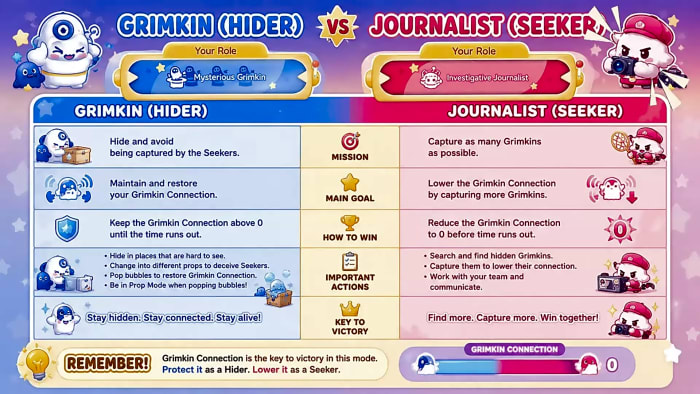
Here are some helpful tips for Grimkins and Investigative Journalists.
Tips for Investigative Journalists Gameplay
- Use the notification of Grimkin’s distance meter to track down the location of the Grimkins. Some of the Grimkins are hidden well, in rough places, here the meter mechanics will immediately help you out.
- If the prop seems out of place, compare the prop to the list of props at the bottom of the screen to locate the Grimkins.
- Your goal here is always going to be to lower the Grimkin Connection bar, which appears at the top-left of the screen, from 100% to 0%. While it might feel easy, you must bring the connection bar to 0 before the timer runs out.
Tips for Grimkin Gameplay
- Use the Mischief mode to lay out fake props or decoys to confuse the journalist. The time is limited, so always take the time to place the fake decoys. I will recommend placing them out of the common view, since Mischief time also allows journalists to remember the prop locations.
- Press the Lock icon to see the seekers or journalists in ghost mode. Use the ghost mode to learn the location of the seekers and warn other Grimkins.
- One exclusive gameplay mechanic you will deal with as a Grimkin is the bubbles with a star inside them. Pop them as a Grimkin to raise the Grimkin Connection progress bar. Each time you pop these buttons, it brings some of the progress to the Grimkin Connection bar, not all. You will also get an indicator on the HUD showcasing the distance of the bubble from your prop.
Note: The bubbles also disappear if you fail to pop them, so every time you spot a bubble in your game, try to pop it to maintain the Grimkin Connection bar.
I know what you are thinking, you can’t lock your prop and use the ghost-mode to pop the bubbles, you will need to be inside the prop to burst the bubbles.
- And lastly, change your props from time to time to further spread confusion in the minds of journalists.
That’s it, now you know everything you need to know about the Hide & Seek party in Heartopia. While you are here, why not check out some of our other guides, such as where to find Mussels in Heartopia?
More must-reads:
- Biggest question facing Dodgers, Brewers heading into NLCS
- NFL insider shares major update about potential Tyreek Hill return to NFL after admission
- The 'Most 3-HR MLB Playoffs' quiz
Breaking News
Trending News




Customize Your Newsletter
 +
+




Get the latest news and rumors, customized to your favorite sports and teams. Emailed daily. Always free!
PRIVACY POLICY COOKIE POLICY CONTACT US
ABOUT YARDBARKER TERMS OF SERVICE


By using this site, you agree to our Terms of Service and Privacy Policy.
This site is for entertainment purposes only.
There is no gambling offered on this site.
Gambling Problem? Call 1-800-Gambler.