-

-


Follow Us
-

 On Facebook
 On Flipboard


Cheaters in NBA 2K26 might want to start practicing honest basketball. The latest patch has officially put exploiters on notice, targeting one of the most frustrating tactics in competitive online play—network manipulation, better known among players as “lag switching.”
Anyone who spends time in Park or REC has likely run into the occasional game where everything suddenly slows to a crawl at the worst possible moment. While the update won’t magically eliminate every bad actor overnight, it does signal that the developers are actively trying to clean up the online experience.
New Update Targets Online Cheating
The newest NBA 2K26 update introduces new protections designed to combat network manipulation across several major online modes. According to the official patch notes released by 2K Sports, the update adds safeguards meant to detect and limit tactics such as intentional lag switching—an exploit some players use to disrupt connections and gain an advantage during online games.
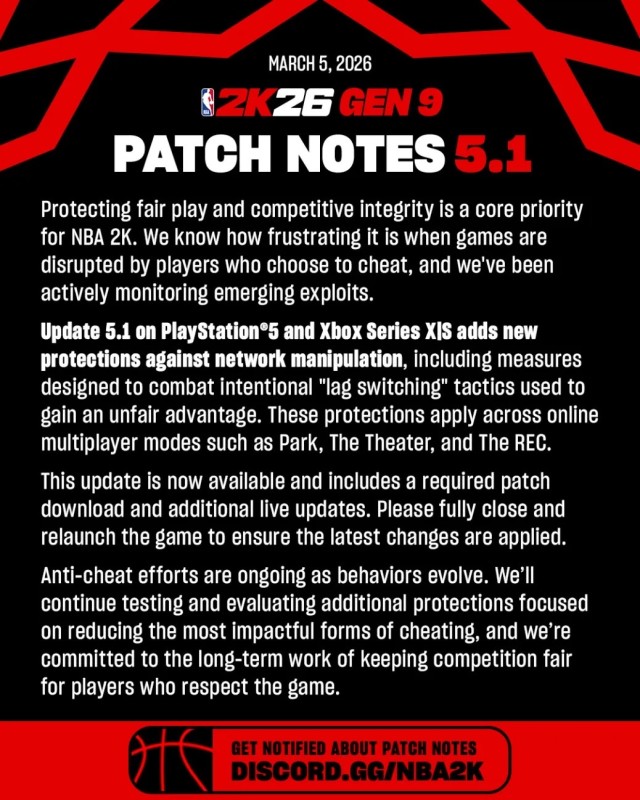
These protections apply to multiplayer environments including Park, The Theater, and The REC, which are among the most competitive online spaces in the game. By tightening the system’s ability to detect suspicious network behavior, the update aims to keep matches smoother and fairer for players who simply want to hoop without technical interference.
The patch is now live on PlayStation 5 and Xbox Series X|S, and players are advised to fully restart the game to ensure the new protections and live updates are applied correctly.
February Update Focused on Stability and Fixes
Prior to this anti-cheat push, the February NBA 2K26 update focused primarily on stability and quality-of-life improvements across several game modes.
On the gameplay side, developers addressed a rare hang that could occur during an inbounds play following a blocked shot, along with a separate issue that could cause the game to freeze during pregame shootarounds. The update also fixed a problem preventing players from completing the Alley-Oop tutorial in Learn 2K.
City improvements targeted stability as well, resolving hang scenarios tied to store browsing, Crew Member screens, MyCOURT season progression, and certain menu transitions. Player Matchup screen stat visibility and pre-introduction menu behavior were also corrected.
Meanwhile, MyTEAM received adjustments correcting badge visibility in the Coaching tab and ensuring Dynamic Duo boosts display properly. Additional fixes were implemented across menus for improved clarity.
Updates also touched MyNBA, MyGM, and The W, including a fix for a timing-related hang when exiting modes with customized team logos. Presentation during FIBA championship celebrations was also corrected, and a PC-specific issue involving custom uniform font saving was resolved.
Finally, several players received updated likenesses or hairstyles, including Deandre Ayton, RJ Barrett, Cade Cunningham, DeMar DeRozan, Ausar Thompson and others.
More must-reads:
- Caitlin Clark continues climb in WNBA player power rankings
- Klay Thompson's father explains why he snubbed the Lakers
- The 'Most TD passes in first two seasons' quiz
Breaking News
Trending News




Customize Your Newsletter
 +
+
Get the latest news and rumors, customized to your favorite sports and teams. Emailed daily. Always free!
PRIVACY POLICY COOKIE POLICY CONTACT US
ABOUT YARDBARKER TERMS OF SERVICE


By using this site, you agree to our Terms of Service and Privacy Policy.
This site is for entertainment purposes only.
There is no gambling offered on this site.
Gambling Problem? Call 1-800-Gambler.